Category: Battle Royale

  • PUBG Mobile Maps The Complete Guide (2026)

    PUBG Mobile Maps The Complete Guide (2026)

    PUBG Mobile has one of the most diverse map pools in mobile gaming. From the classic 8x8km battlegrounds to tiny 1x1km sprint maps, each one plays completely differently. Here’s every map you need to know, what makes it unique, and where to land.

    Quick Reference: All Maps at a Glance

    MapSizePlayersMatch TimeBest For
    Erangel8×8 km10025–35 minAll-around, balanced play
    Miramar8×8 km10025–35 minLong-range sniping
    Sanhok4×4 km10015–20 minFast-paced, close combat
    Vikendi6×6 km10020–30 minMid-range, tactical play
    Karakin2×2 km6410–15 minAggressive, explosive play
    Livik2×2 km5215 minQuick sessions, mobile exclusive
    Nusa1×1 km4010 minFastest matches, mobile exclusive

    1. Erangel: The Home of PUBG

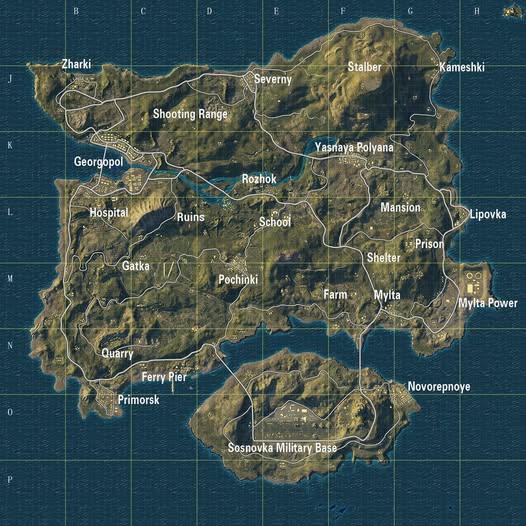
    Erangel is where PUBG began and it’s still the most balanced map in the entire game. Erangel is the original PUBG map set in a Soviet-era dystopia. Everything from open fields to dense military compounds exists here, making it the perfect map to learn every playstyle.

    The map rewards every approach equally. Close-range fighters thrive in Pochinki and the Military Base. Snipers dominate the open fields around Georgopol and Stalber. Erangel is the only map great for everything, including close-range fights, sniping, and vehicle chase fights. It’s an 8x8km area with small outcroppings of buildings, some places covered with grassland and trees, and some open places with ridges.

    Best drop spots: Pochinki, Georgopol, Military Base, School, Novorepnoye.

    2. Miramar: The Desert Sniper’s Paradise
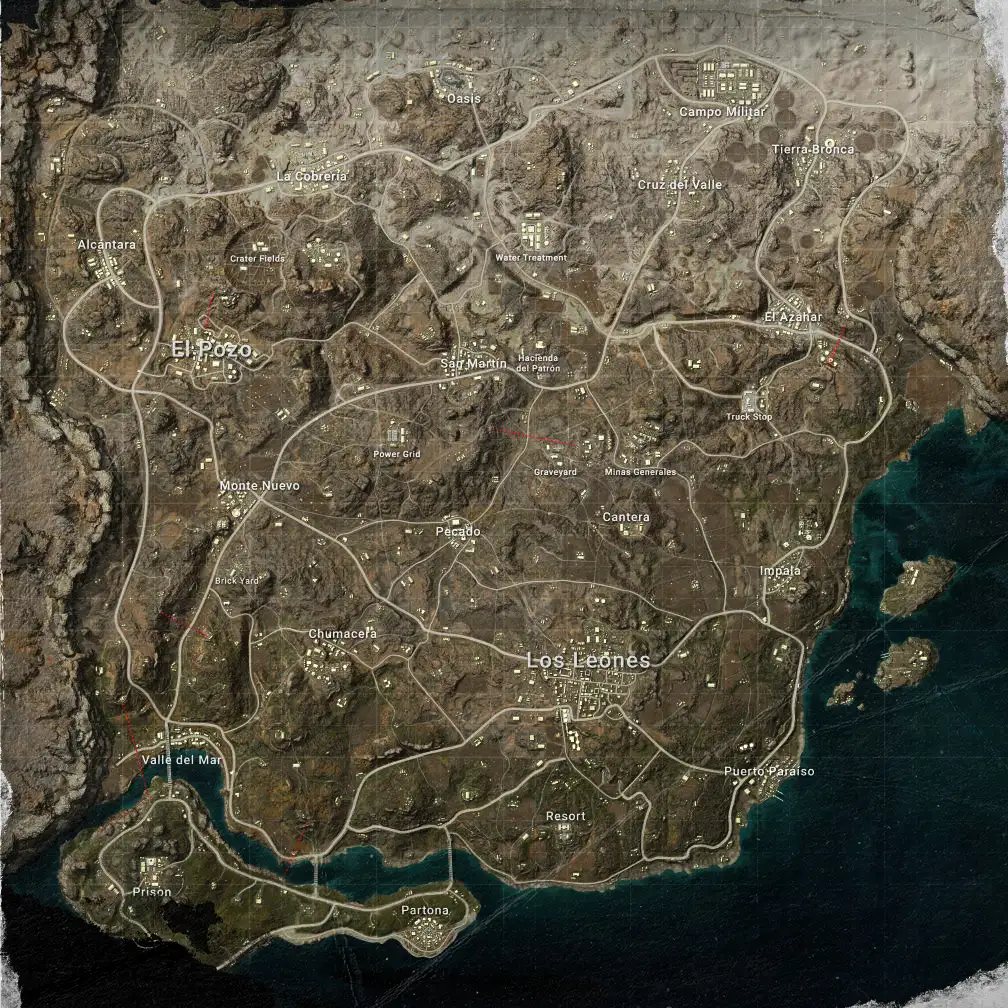
    Miramar is the most punishing map in PUBG Mobile if you’re not prepared. Miramar is a Central American desert map covered with mountains, ridges, and massive open spaces. Every rotation requires planning because cover is sparse and sightlines are enormous.

    Run across an open hillside carelessly and you’ll be picked off from 400 metres away before you hear the shot. The combat tends to be slower than on other maps. Leaving an urban area and taking a trip into the desert results in intense standoffs. Miramar’s best loot spots include El Pozo, Los Leones, Pecado, and the Hacienda del Patron.

    Best drop spots: Los Leones, El Pozo, Pecado, Hacienda del Patron.

    3. Sanhok: Chaos in the Jungle
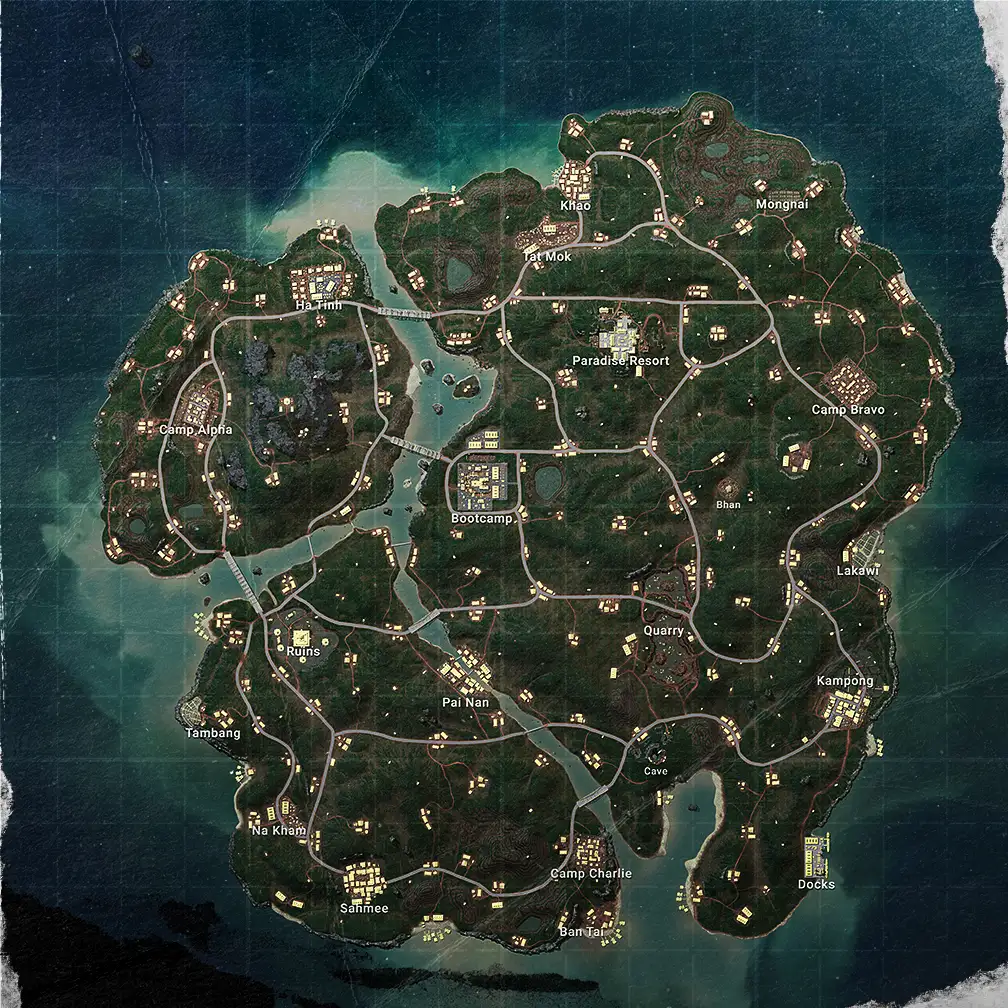
    Sanhok is where you go when you want a fight in the first 60 seconds of a match. Sanhok is the 4x4km map totally covered with grass and trees. It looks like a rainforest with some areas covered by mountains and cities.

    Sanhok’s small size and dense forest make it perfect for fast-paced close-quarters gunfights. Early-game encounters are almost guaranteed, so finding decent loot right away is critical. The best places for top-tier gear are Bootcamp, the Ruins, and Paradise Resort.

    If you want to avoid early fights, try landing at the Kampong or the Docks instead.

    Best drop spots: Bootcamp, Paradise Resort, Ruins, Kampong.

    4. Vikendi: Snow, Trains, and Tactics
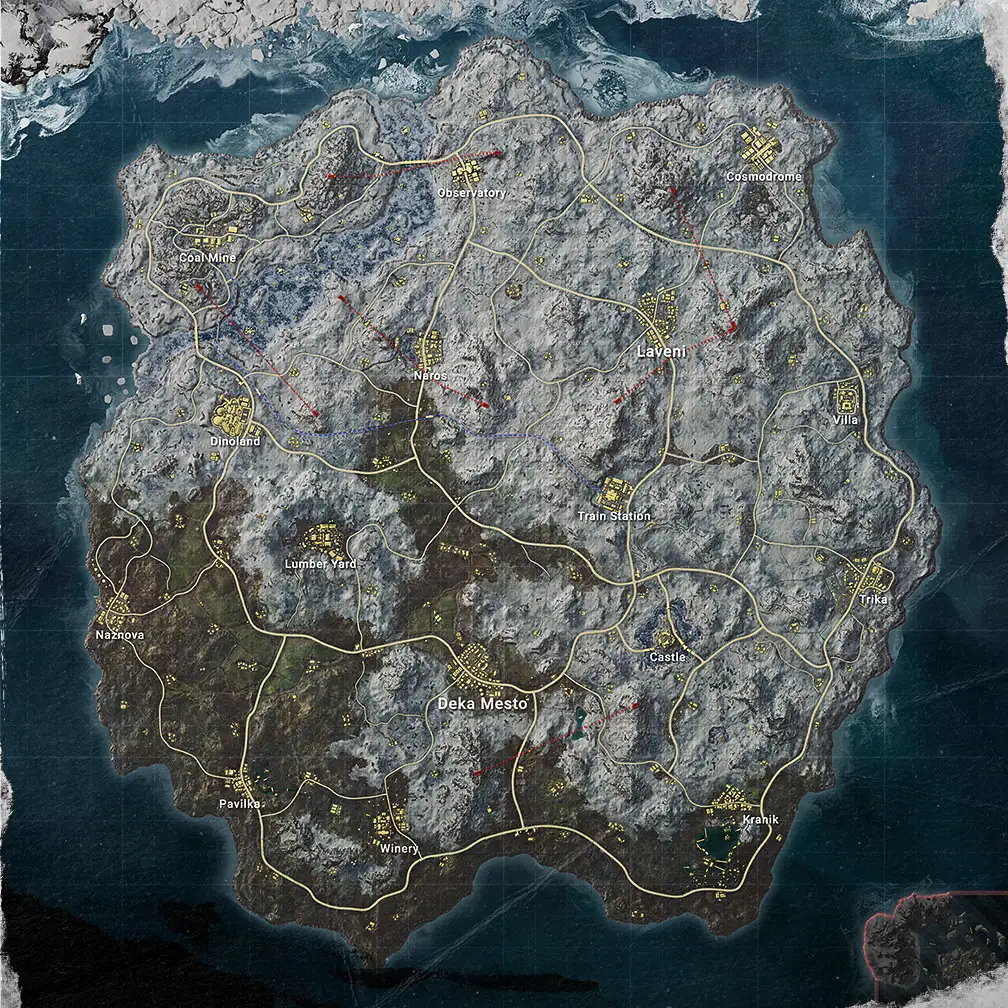
    Vikendi is the most atmospheric map in PUBG Mobile and the most tactically unique. It’s a 6x6km map based on an isolated Northern resort island with both day and night versions available.

    The working train system is Vikendi’s signature feature. Jumping on a train is a handy way to move across the map, but they’re not exactly stealthy. You can hop on at one of the map’s 11 train stations and the schedule is the same for every match.

    Footprints in the snow give away enemy positions a mechanic unique to Vikendi that completely changes how you move and rotate. The best Vikendi loot spots are the Cosmodrome, Dinoland, Castle, and Cement Factory.

    Best drop spots: Cosmodrome, Dinoland, Castle, Villa.

    5. Karakin: Demolition Derby
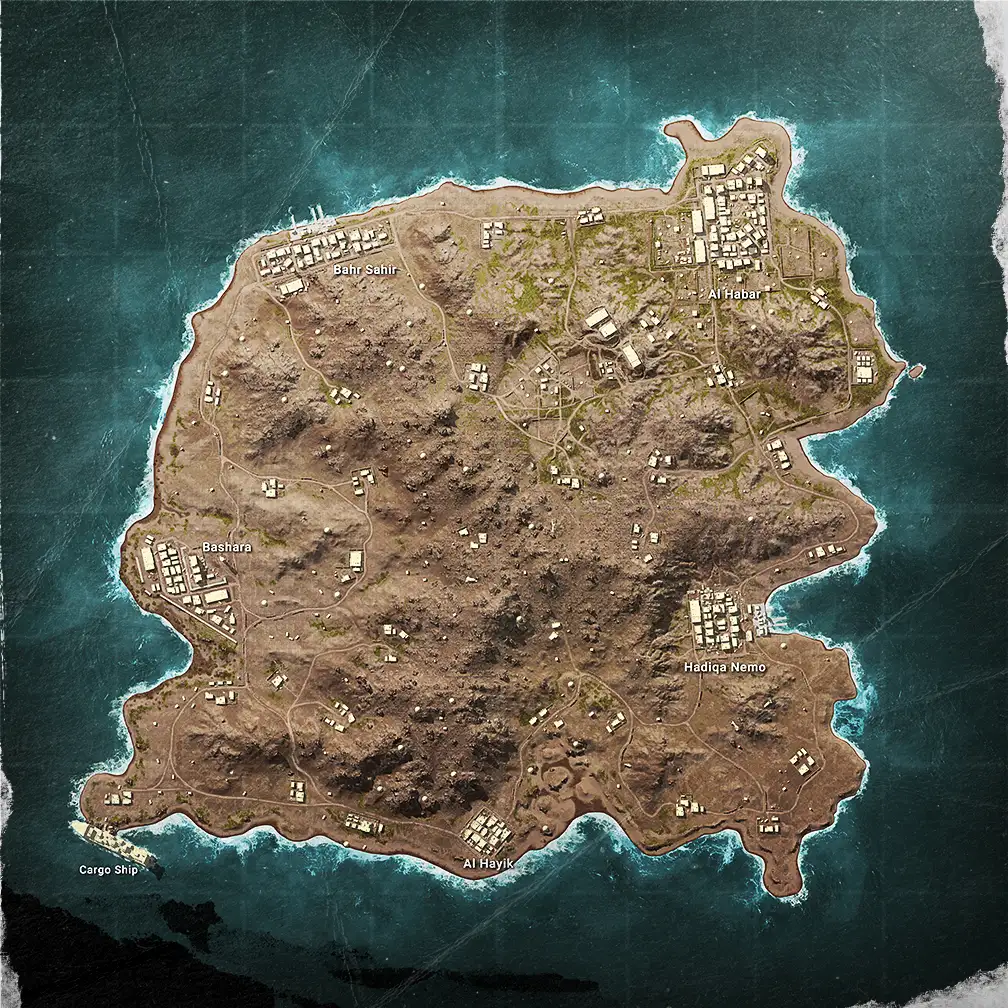
    Karakin is PUBG Mobile’s most explosive and aggressive map by design. The Karakin map may look like a tiny Miramar, but its combat pace is much, much faster. At just 2x2km, there is nowhere to hide and nowhere to camp safely.

    The destructible walls are what define it. Sticky bombs allow players to blow through walls, meaning no building is truly safe cover. Every wall is potentially a door for an enemy with explosives and it changes how you think about cover entirely.

    With 64 players on 2x2km, encounters happen constantly and the circle forces action from the very first minute. If you want to practice aggressive plays and close-range gunfights, Karakin is your training ground.

    Best drop spots: Hadiqa Nemo, Al Habar, Cargo Ship.

    6. Livik: The Mobile Exclusive
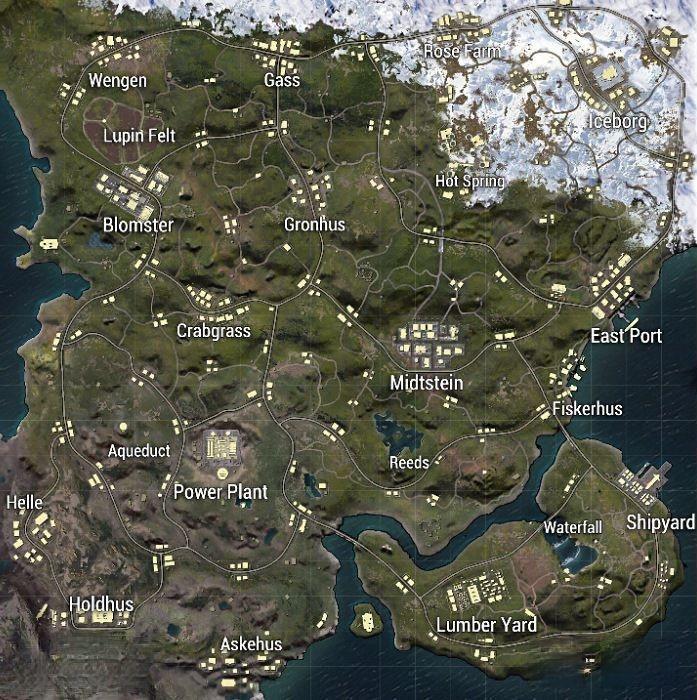
    Livik was built specifically for mobile players and it shows in every design decision. Livik is the first PUBG Mobile exclusive map, released in July 2020 in Beta and officially launched in May 2022. The map houses up to 52 players in a 2x2km area and can be completed in as little as 15 minutes.

    The terrain variety is extraordinary for a 2x2km map. Livik features unique mechanics only available here including ziplines, treasure maps leading to high-tier loot, and secret locations. You can even play soccer at the Soccer Field.

    Beneath it all is Livik’s volcano which can erupt at any given moment, forcing players to dodge explosions and shelter in buildings. It’s the kind of dynamic environmental feature no other PUBG map has.

    Exclusive to Livik: The Monster Truck vehicle and XT weapons found at buy stations and supply crates that are more powerful than standard weapons anywhere else in the game.

    Best drop spots: Midstein, Blomster, Power Plant, Hot Springs.

    7. Nusa: The Sprint Map
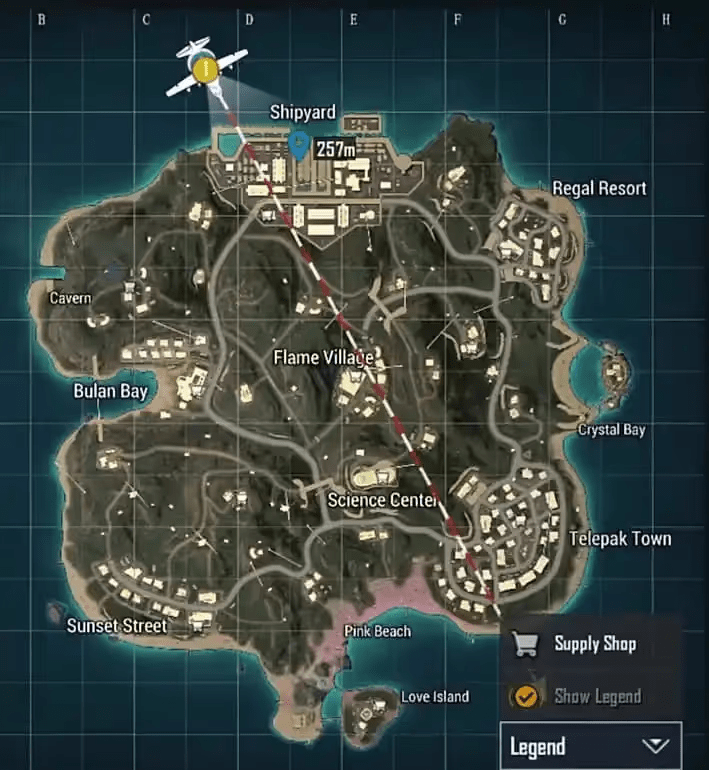
    Nusa is PUBG Mobile’s smallest map and its fastest experience. Nusa is just 1×1 kilometres in size and became the second mobile-exclusive map after Livik.

    With 40 players on 1km of island terrain, the match is essentially one long continuous firefight. There are no slow rotations, no quiet phases, no camping opportunities. The moment you land, combat begins and doesn’t stop until the circle closes.

    Nusa introduced two exclusive weapons on launch including the NS2000 Shotgun and the Tactical Crossbow, alongside a brand new vehicle exclusive to the map. It’s the perfect map for players who have 10 minutes and want a complete match experience.

    Bonus: Metro Royale Mode

    Beyond the classic BR maps, PUBG Mobile has Metro Royale with its own exclusive map. Metro Royale is a spin-off mode with its own dedicated map, completely separate from the Classic rotation.

    It plays like a PvPvE extraction shooter. You land with limited gear, fight both AI enemies and real players, loot for high-tier equipment, and extract safely before dying. Metro Royale received a major upgrade in Version 3.9 with a new tiered monster system, deeper player progression, and hatchable creatures added to Zombie Uprising mode.

    Which Map Should You Play?

    Your PlaystyleBest Map
    Learning the gameErangel, balanced and teaches all skills
    Sniper mainMiramar, open terrain and long sightlines
    Aggressive rusherSanhok or Karakin, constant combat
    Tactical playerVikendi, trains, footprints, positioning
    Short on timeLivik (15 min) or Nusa (10 min)
    PvPvE extractionMetro Royale

    The honest answer for beginners: start on Erangel. It teaches every fundamental including looting, rotation, vehicle use, zone management, and every range of combat in one map. Each map presents unique sightlines, loot routes, and rotation choices and once Erangel feels natural, every other map just becomes a variation on what you’ve already learned.
  • Call of Duty Mobile Pro Tips to Play Better in 2026

    Call of Duty Mobile Pro Tips to Play Better in 2026

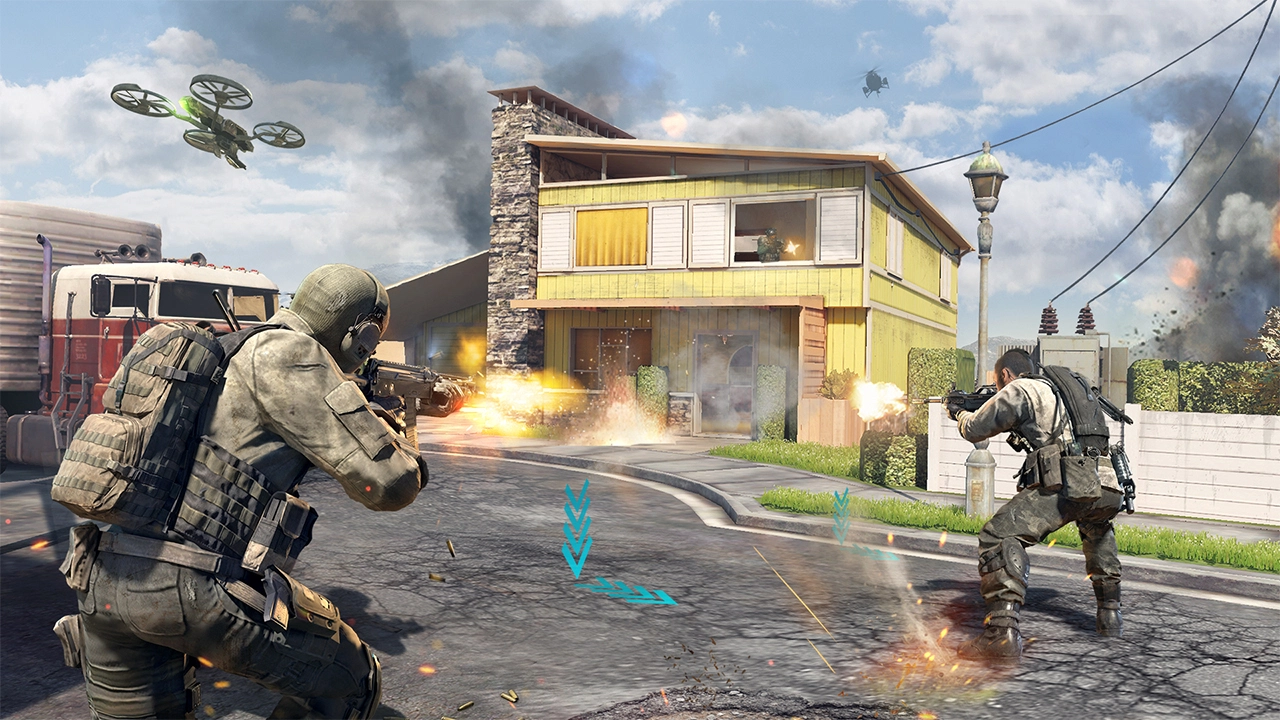
    COD Mobile is still the undisputed king of mobile shooters and in 2026 the skill gap between casual and pro players is bigger than ever. Becoming a pro in CODM is less about superhuman reflexes and more about mastering your environment, settings, and strategic movement. Here’s everything you need, from settings to battlefield discipline.

    Part 1 Settings That Change Everything

    Switch to Four-Finger Claw Immediately

    The two-thumb playstyle has a hard ceiling and you’ll hit it fast in ranked. The Four-Finger Claw layout is the industry standard for pro players. By using your index fingers for jumping, sliding, and shooting while your thumbs handle movement and aiming, you can perform multiple actions simultaneously.

    This layout is the foundation of high-level CODM gameplay it lets you shoot, jump, and aim at the same time instead of choosing one. Pro players like HawksNest use 4-finger layouts, while iFerg plays with advanced multi-finger setups.

    Split Your ADS and Fire Buttons

    This single setting change improves your reaction time immediately. Using the combined ADS to Fire option slows your reaction especially for Snipers. Split your ADS and Fire buttons to gain faster response time and tighter aiming control during close and long-range engagements.

    It feels awkward for a day then it becomes muscle memory and you’ll never go back.

    Enable the Split Throw Button

    Getting stuck in a grenade menu mid-fight is a death sentence. Enable Split Throw Button to assign separate keys for Lethal and Tactical Grenades crucial for quick reaction moments in close-quarters combat.

    Activate Left-Handed Tactical to use tactical gear with your left hand while keeping your main aim steady a favourite trick of professional players to maintain pressure during combat.

    The Exact Sensitivity Settings for 2026

    Don’t copy-paste random sensitivity numbers understand what each setting does first.

    Standard Sensitivity (65–85) controls how fast your view moves while running medium values balance speed and control. Firing Sensitivity (90–100) affects aim while shooting this range works best for ARs and SMGs for tracking and recoil control.

    Here’s the full pro-recommended sensitivity table for 2026:

    SettingRecommended RangeWhy
    Camera (Standard)65–85Balances turning speed and precision
    Camera (ADS)70–85Precise aim when scoped in
    Firing (Standard)90–100Better tracking and recoil control for ARs/SMGs
    Camera FOV80–90Popular for balanced view and reaction speed
    GyroscopePersonal preferenceBalance with touch sensitivity don’t go too high
    Speed AccelerationOff (default)For most players, off means steadier aim

    The golden rule: don’t change your settings every few games. Practice for several days before re-adjusting muscle memory needs consistency to build.

    Graphics and Performance Settings

    Always prioritise frame rate over visual quality every time. Always prioritise max frame rate over high graphics quality a smooth game beats a pretty one in every firefight.

    Set Graphics to Low or Medium this helps render large maps more smoothly and keeps your frame rate stable during intense gunfights where every millisecond counts.

    Turn SFX Volume to 100%. SFX Volume at 100% is critical you need to hear footsteps, vehicle sounds, and enemy movements clearly. Sound wins more gunfights than aim does.

    Part 2 Movement Is Your Greatest Weapon

    Master Slide Cancelling The Most Important Skill of 2026

    A stationary target in CODM is a dead target. Master Slide Cancelling slide and immediately tap the jump button to cancel the animation. This keeps your momentum high and resets your Tactical Sprint, making you a much harder target to track. It is the most important movement skill to learn in 2026.

    Practise this in Training Mode until it’s automatic. It should feel like breathing not something you think about during a fight.

    The Drop Shot Instant Level Up

    The Drop Shot is the second movement skill every serious player needs. It means going prone the moment an enemy fires at you the sudden positional shift throws off aim assist and forces the opponent to readjust.

    Combine it with Slide Cancelling and you become genuinely difficult to track in close-range fights. Movement is your greatest weapon speed and unpredictability win fights.

    The Switching Trick Nobody Teaches

    Switching to your melee or grenade while sprinting gives you a speed boost. Switching to your melee weapon, grenade, or trophy system while sprinting gives you a noticeable speed increase a tiny edge that can mean the difference between reaching cover or getting caught in the open.

    Pro players do this constantly between engagements. It’s a free movement upgrade that requires zero aim skill to use immediately.

    Part 3 Loadout and Game Sense

    Build a Diverse Arsenal Don’t Just Main One Gun

    The meta in 2026 shifts every season and players who only know one gun get left behind. Level up all your weapons. When a new season drops and the old favourite gets nerfed, have three other fully-levelled guns ready to go. Experimentation is key don’t just copy a loadout from online; tweak the attachments in the Gunsmith to suit how you move and shoot.

    Focus on attachments that balance recoil control with mobility. In the current meta, speed is king if your gun takes too long to ADS, even the best accuracy won’t save you from a faster opponent.

    Best Loadout Approach by Playstyle

    PlaystylePrimary WeaponKey Attachment Focus
    Aggressive RusherSMG (fast ADS, high mobility)Recoil control + shorter barrel
    Mid-Range FighterAR (balanced)Stock + grip for stability
    Long RangeSniper + Pistol sidearmScope + aim assist stock
    Ranked GrinderMeta AR or SMGFull recoil control build
    BR PlayerAR + Sniper comboRange + extended mag

    Battle Royale vs Multiplayer Different Settings, Different Skills

    These modes reward different habits don’t play BR like TDM. BR demands awareness while Ranked focuses on speed and reaction tweak your HUD layout and FOV accordingly for each mode.

    In BR specifically: Enable Auto Sprint, set FOV to 85–90 for expanded peripheral vision, and enable the grenade slot, revive button, armour use, and quick weapon switch in your HUD. These aren’t optional in late-game circles they’re survival tools.

    Use the Gyroscope Seriously

    The gyroscope is one of the most underused pro tools in CODM. In COD Mobile, the gyroscope uses your device’s motion sensors to control your aim instead of relying solely on your thumbs to swipe and adjust your crosshairs, you can physically move your device. This allows for finer, more precise adjustments, especially when tracking moving targets or making crucial long-range shots.

    Enable it for ADS only first full-time gyro is disorienting until you’re used to it. Use it for sniper scopes and long-range ADS, and let your thumbs handle everything else. Within a week it feels natural.

    Ranked Discipline The Habits That Actually Win

    Position before aim. The player with better cover wins the majority of gunfights regardless of sensitivity settings. Never push an enemy who has higher ground or better cover reposition first.

    Communicate in ranked even if solo. Combine optimised settings with map knowledge, movement, and team communication to truly level up your gameplay. Pinging enemies costs you nothing and saves your team everything.

    Quick Pro Tips Cheat Sheet

    TipWhy It Matters
    4-Finger Claw layoutPerform multiple actions simultaneously
    Split ADS + FireFaster reaction time in every gunfight
    Slide Cancel constantlyResets sprint, makes you harder to track
    SFX Volume 100%Hear footsteps and movements clearly
    Max Frame Rate, Low GraphicsSmooth over pretty, every time
    Don’t change settings dailyMuscle memory needs consistency
    Level all weaponsNever caught off-guard by a meta shift
    Gyroscope for ADSFiner aim adjustments at long range
    Melee switch while sprintingFree speed boost between engagements
    Train in Practice Range firstTest new settings before ranked

    The honest truth about climbing ranks in CODM? Settings get you to a competitive baseline everything above that is movement discipline and game sense. Master Slide Cancelling first. Get comfortable on 4-Finger Claw. Keep SFX at 100%. Do those three things and you’re already ahead of the majority of the lobby.