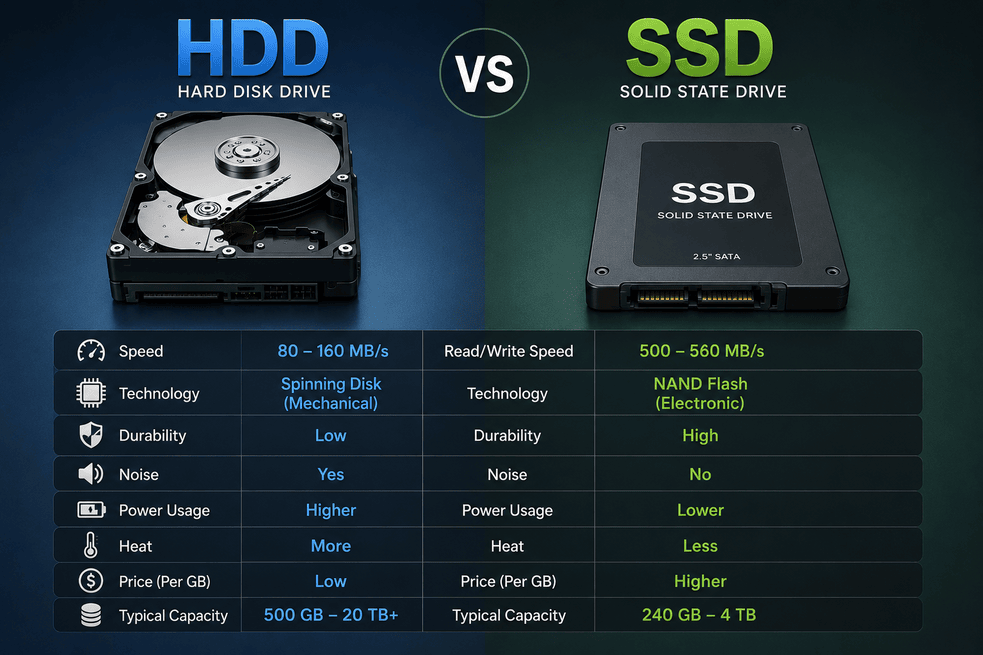
Your computer stores everything on a drive Windows, your apps, your games, your files. The type of drive you have has a bigger impact on how fast your PC feels than almost anything else. Most people never think about it, but it’s the single most important factor in whether your computer feels fast or frustratingly slow every single day.
There are two main types: the old HDD (Hard Disk Drive) and the newer SSD (Solid State Drive). Let’s break down exactly what they are, how different they actually are in real numbers, and what’s coming next.
WHAT THEY ARE
SSD – Solid State Drive
An SSD has no moving parts at all. It works like a very large USB stick it stores and reads data using electronic chips. When you ask it for a file, it finds it almost instantly because there’s nothing physical that has to move. It makes no noise, it doesn’t vibrate, and dropping your laptop won’t destroy your data. This is what almost every new laptop and PC ships with today.
HDD – Hard Disk Drive
An HDD is a spinning magnetic disk, almost exactly like a vinyl record, with a tiny reading arm that has to physically swing across the disk to find your data. Every time you open a file, that arm has to locate it on the spinning disk. The faster the disk spins, the faster it can find things but it’s still mechanical, which means it has physical limits. It makes a quiet humming sound when running, and dropping it even slightly can damage or destroy all your data permanently.
REAL PERFORMANCE NUMBERS GAMES AND SOFTWARE
This is where the difference stops being abstract and starts being something you feel every single day.
Windows Startup Time
On an SSD, Windows starts up in about 8 to 12 seconds. On an HDD, the same Windows installation takes 45 to 90 seconds. That’s not a small difference you’re staring at a loading screen for over a minute every time you turn on your PC.
Adobe Photoshop Launch Time
Photoshop opens in roughly 4 seconds on an SSD. On an HDD, it takes 22 to 30 seconds to fully load. If you use creative software regularly, this adds up to many minutes of waiting every single work session.
GTA V Loading Into the Game World
On an SSD, you’re in the game in about 30 seconds. On an HDD, the same load takes 4 to 6 minutes. That’s not a typo. Players on HDDs were so well known for long load times that Rockstar Games actually released a patch specifically to speed up HDD loading after a modder discovered the game had inefficient code making it worse.
Microsoft Excel Opening a Large 50MB File
On an SSD, a large spreadsheet opens in about 2 seconds. On an HDD, the same file takes 12 to 18 seconds. For anyone doing data work or finance work, this kind of delay happens dozens of times a day.
Call of Duty Warzone Map Loading Screen
On an SSD, you’re into the match in about 25 seconds. On an HDD, loading takes 2 to 3 minutes and Warzone is known for actually kicking players with HDDs during loading because the game’s servers consider them too slow to keep up with other players. You don’t just wait longer. You get removed from the game entirely.
Drive Read Speed How Fast Data Reaches Your Software
This is the raw measurement of how quickly the drive can hand data to your software. An NVMe SSD (the fastest common type) reads at around 3,500 MB per second. A SATA SSD (older type) reads at around 550 MB per second. A standard HDD reads at 80 to 160 MB per second. Think of MB/s like lanes on a highway more lanes means more data delivered to your software at once, which means faster everything, across every app you use.
QUESTIONS YOU PROBABLY HAVE
Q: If SSD wins at everything, why do people still buy HDDs?
Because of storage space per rupee or dollar. A 4TB HDD that’s 4,000 GB, enough for 40 or more big games costs around 60 to 70 percent less per gigabyte than an SSD of the same size. If you have hundreds of movies, years of photos, or archived work files you rarely open, it makes perfect financial sense to store all of that on a cheap HDD. Speed only matters when you actually open a file. Data sitting on a drive doing nothing doesn’t benefit from speed. So most smart setups use an SSD for Windows and active software, and an HDD for bulk storage.
Q: Does the type of SSD matter? What is NVMe?
Yes not all SSDs are equal, and this matters more than most people realize. SATA SSDs are the older type and plug in using the same cable as a regular hard drive. They’re faster than HDDs but limited by that older connection. NVMe SSDs plug directly into your motherboard through a dedicated slot and use a much faster connection. An NVMe SSD is about 6 times faster than a SATA SSD, and about 30 to 40 times faster than a standard HDD. If your PC or motherboard supports NVMe, always choose it for your main Windows drive.
Q: Will an SSD make my old PC faster overall?
Yes and it’s usually the single most impactful upgrade you can make to an aging computer. If your PC is slow to start, slow to open apps, or freezes up when you have several things open at once, there’s a very high chance the HDD is the main bottleneck, not the processor or RAM. Replacing the HDD with an SSD can make a 7-year-old computer feel 3 to 4 times more responsive for everyday use. Your RAM and processor still matter for heavier tasks like video rendering or gaming graphics, but a slow HDD drags down everything else first.
Q: Can software actually fail or crash because of a slow HDD?
Absolutely. This is becoming more common as software gets larger and more complex. Games like Cyberpunk 2077 and Fortnite now list an SSD as a minimum system requirement not a recommendation, but a requirement. On an HDD, textures fail to load in time, so you see blurry walls, invisible objects, or environments that pop into existence right in front of you mid-game. Warzone is the most famous example it actively removes players with HDDs from loading screens because the game treats their loading speed as a connection problem. This issue will only get worse as games and software grow larger.
Q: Can software actually fail or crash because of a slow HDD?
Absolutely. Games like Cyberpunk 2077 and Fortnite now list an SSD as a minimum system requirement not a suggestion. On an HDD, textures fail to load fast enough, so you see blurry walls, pop-in objects, or invisible enemies. Warzone is the most famous example it kicks HDD players during loading because the game interprets slow loading as a connection issue. This will only get worse as games grow larger and stream data in real-time during gameplay.
HOW THEY COMPARE IN PRICE
These are percentage comparisons, not exact prices, since prices vary by brand, capacity, and region. The key thing to understand is the relative value.
HDD is the cheapest option and acts as the baseline.
SATA SSD costs roughly 2 to 3 times more per gigabyte than an HDD of the same size.
NVMe SSD costs roughly 3 to 4 times more per gigabyte than an HDD.
NVMe Gen 5 SSD, the newest and fastest type, costs roughly 6 to 8 times more per gigabyte than an HDD.
The good news is that SSD prices have dropped dramatically over the past 3 years. A solid 1TB NVMe SSD today costs roughly the same as a 1TB HDD cost back in 2018. The gap is closing fast, and for most people the price difference for a 1TB drive is no longer a huge barrier.
NEW STORAGE TYPES ENTERING THE MARKET
The storage industry is moving quickly. Here’s what’s arriving in mainstream PCs right now or in the next one to two years.
NVMe Gen 5 SSD Available Now
This doubles the speed of today’s most common NVMe Gen 4 drives and reaches up to 14,000 MB per second. To put that in perspective, a large game like Elden Ring that takes up 45 GB would be fully read from the drive in about 3 seconds. It requires a newer motherboard Intel 12th generation or newer, or AMD Ryzen 7000 series or newer. It runs hot and needs a heatsink. Prices are premium right now but are dropping every few months.
QLC NAND Bigger and Cheaper SSDs (Arriving 2025–2026)
This is a new chip design that stores more data per chip without increasing the physical size of the drive. It’s what will make 4TB and 8TB SSDs affordable for everyday home users. If you currently own a large HDD just because SSDs at that size are too expensive, QLC NAND is what changes that equation over the next year or two.
Computational Storage Drive, or CSD (Arriving 2025–2026)
This is a storage drive with a small built-in processor. Instead of sending all data to your main CPU to be processed, the drive handles certain basic tasks on its own before passing results to your computer. This speeds up things like video editing exports, database queries, and AI tools that run locally on your PC. It’s particularly useful for content creators and developers.
PCIe 5.0 M.2 Becoming Mainstream
The M.2 slot is the connector that NVMe SSDs plug into on your motherboard. PCIe 5.0 is the new version of this connection, and it doubles the bandwidth available compared to PCIe 4.0. New gaming PCs and workstations are increasingly shipping with PCIe 5.0 as the default, which is what unlocks the full potential of Gen 5 SSDs. If you’re buying a new PC in 2025, look for this.
HAMR Hard Drives Next-Generation HDD (Future / Enterprise)
Seagate has developed a technology called Heat-Assisted Magnetic Recording, or HAMR. It uses a tiny laser to briefly heat the disk surface before writing data, which allows much more data to be stored per drive. Drives with 32TB and above are already shipping to businesses and data centers. These won’t appear in most home PCs for a few years, but they’ll be the go-to for people who need massive bulk storage at low cost think home media servers or large backup drives.
DNA and Glass Storage Research Phase
Microsoft and several research institutions are experimenting with storing data in synthetic DNA strands and in layers of etched glass. These technologies can theoretically store enormous amounts of data in a tiny physical space and last thousands of years without degrading. This is not something you’ll buy for your gaming PC in the near future, but it’s the direction long-term archival storage is heading.
THE BOTTOM LINE
Q: What should I actually buy if I’m building or upgrading a PC today?
The smartest setup in 2025 is straightforward: get a 1TB NVMe SSD for Windows and your active games and apps, and add a 2 to 4TB HDD for everything else old photos, archived files, extra game installs you don’t play often. This gives you maximum speed where it matters and cheap space where speed doesn’t matter.
If budget is tight and you can only do one thing, swap the HDD for even a 500GB SATA SSD. The improvement in how fast and responsive your PC feels every single day will be immediate and significant. It’s the one upgrade that affects every single thing you do on a computer, every single time you use it.
SSD opens GTA V in 30 seconds. HDD takes 4 to 6 minutes. That same gap exists for every app, every boot, every file every day. If your PC has an HDD and feels slow, this is why.
Leave a Reply